TL;DR: Harness approval steps pause a production release pipeline until the right users approve or reject it; Anyshift adds the production impact that should be visible before that approval happens: affected services, owners, dependencies, monitors, and recent changes.

The Harness Approval Moment
Harness is a software delivery platform where teams define pipelines, run deployments, and put control gates in front of production changes. A manual Harness approval step gives the delivery workflow a clear pause point: show the approver a message, require the right user group, and wait for an approve or reject decision before the pipeline moves on.
Harness should still run the approval itself. Anyshift's role is to supply the production context that should appear inside that approval.
For this sandbox, the Harness setup is intentionally minimal: one pipeline called Anyshift Production Review, one stage called Production impact approval, and one manual approval step called Review Anyshift impact. That keeps the workflow focused on the handoff: Harness pauses the production release, enforces the approver group, and records the approve or reject decision; Anyshift fills the approval message with the production facts behind the checkout-api release.
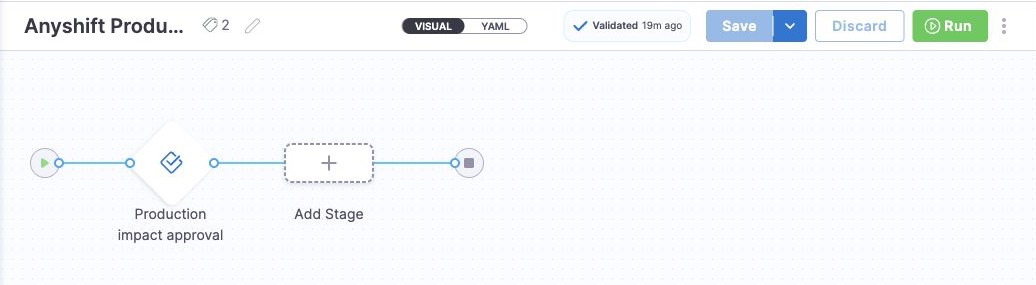
The pipeline now has a clear pause point. The next step is to put the right production facts in front of the approver before they click.
The Production Facts Anyshift Adds
The concrete release is checkout-api, a production service owned by payments-platform. The change touches a shared RDS parameter group, so this is not just a generic deployment checkpoint. A bad rollout could affect runtime database behavior beyond the one pipeline execution.
Before the Harness approval waits for a decision, the approver needs the production facts around that release:
checkout-apiis the affected production service.payments-platformowns the service.- The recent change touches shared database runtime configuration.
- The release should only proceed after the owner reviews the impact.
Harness should not need to infer that graph from pipeline YAML. It should stay the pipeline and approval system of record. Anyshift supplies the cross-system context around the release: affected service, owner, recent infrastructure change, monitors, and the review decision.
Review Production Impact Before Harness Executes
The operator asks for the Harness approval with production impact:
annie do --show-yaml "review Harness approval for checkout-api release with production impact"`annie do` turns that request into a reviewed Harness API runbook. The generated plan keeps the write path narrow: create or reuse the Harness approval pipeline, then execute it with runtime inputs for the approver group.
Before the Harness approval starts, Anyshift generates the short production review that will appear in the approval message:
review:
  release: checkout-api
  affected_service: checkout-api
  owner: payments-platform
  recent_change: rollout touches shared RDS parameter group
  decision: approve only after owner review

harness_actions:
  - create or reuse Anyshift Production Review
  - execute the Harness approval pipeline
  - wait for the approval group to approve or reject
The runbook uses the Harness API to create the pipeline and the pipeline execution API with runtime input YAML to start the approval execution.
The Native Harness Proof
After execution, Harness shows the pipeline waiting on the approval step: 0 of 1 approvals complete, an Approve or Reject button, and the Anyshift production review message inside the native Harness approval pane.
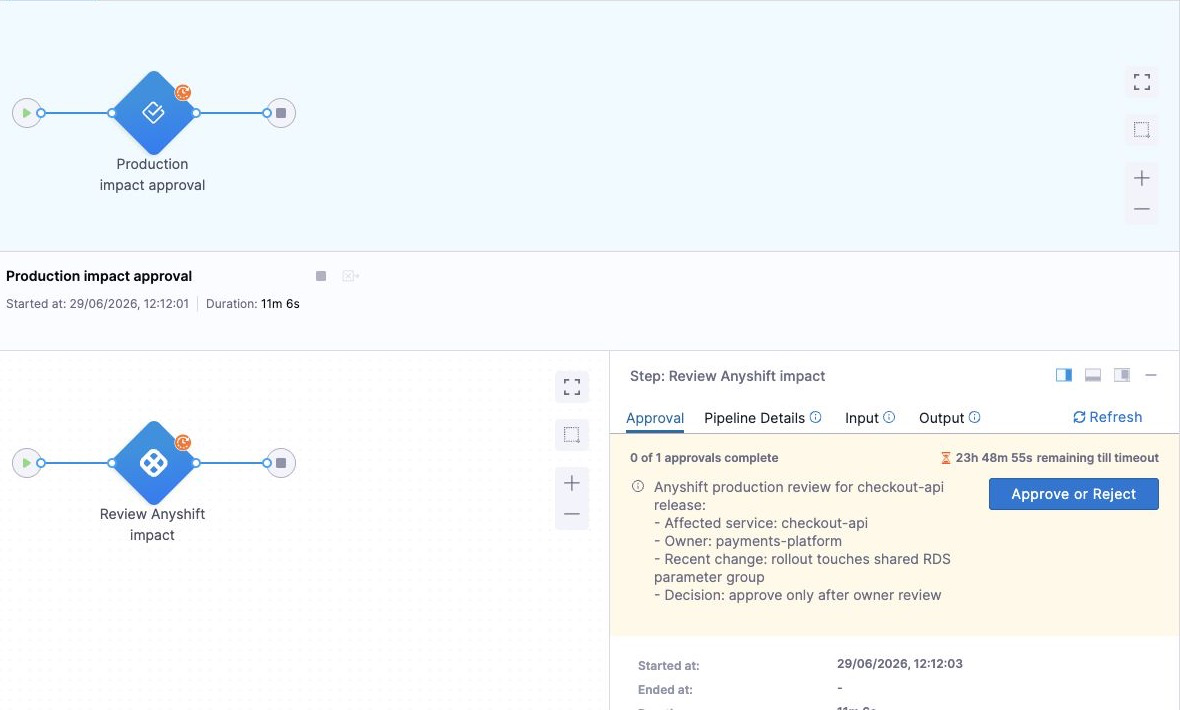
Read the two artifacts together: Anyshift explains the production risk in the approval message; Harness shows the approval that is actually waiting in the delivery workflow.
Why A Pipeline Approval Is Not The Whole Review
Harness already gives teams the right delivery control point: stages, steps, user groups, execution history, and approve or reject decisions. The missing layer is not another approval UI. It is the graph context that crosses the delivery system boundary:
- which production service the release affects;
- who owns that service;
- which infrastructure or dependency changed recently;
- which monitors should catch a bad rollout;
- which non-production paths should stay out of the decision.
That is the joint surface: Harness owns the pipeline gate; Anyshift answers whether the production system behind that gate is ready for the release.
What Teams Get
Platform and release teams keep Harness as the approval surface and add better evidence around each decision:
- Approve with context: the approver sees the service, owner, and recent production change before clicking.
- Keep the native gate: approvals still happen in Harness, with the same user groups and execution history.
- Reduce manual reconstruction: teams do not need to assemble ownership, dependency, and monitor context in a chat thread before every sensitive release.
The nearby workflows follow the same shape: annotate high-risk deployments, route approvals to the right service owner, or add production-impact summaries to deployment notifications.
If your team uses Harness and wants production-impact review before approvals instead of manual release context lookup, contact us.