In this demo, annie do prepares a Splunk maintenance mute from Anyshift's production graph. It starts with a neo4j change, finds the services that depend on it, maps them to the Splunk alerts they use, then disables the underlying saved searches with Splunk's own saved-search REST endpoints. After the window, it turns them back on.
Maintenance Noise Has A Graph
A team is preparing a short maintenance window for neo4j. The change looks small from the deploy queue. In production, it isn't small: anyshift-backend, graph-connector, and slackbot all depend on it.
Splunk already has the alerts. Under the hood, many of those alerts are saved searches: named Splunk searches that run on a schedule and can trigger an alert action. What teams usually don't have is a clean list of which ones will make noise during the maintenance, and which ones should stay untouched.
Anyshift CLI             downstream services, saved-search names, evidence
Splunk REST API           disable selected searches, restore them later
Anyshift decides the scope. Splunk performs the write.
The example is intentionally small: one maintenance window, three saved searches, and one unrelated control search. The value becomes clearer when the same mute decision spans many Splunk apps, saved searches, service owners, and environments where a broad mute would hide real signal.

Why A Manual Mute Misses
In Splunk, alerts are commonly backed by saved searches. Splunk's saved search configuration docs describe saved searches as the configuration behind reports, alerts, scheduled searches, swimlane searches, and KPIs; the same object appears in Splunk Web under "Searches, reports, and alerts."
Maintenance changes get messy here. A human can disable the obvious alert, and a deploy script can silence the service being changed, but neither has a reliable view of the downstream searches that fire because a dependency is briefly noisy.
Mute too much and you hide useful signal. Mute too little and downstream teams still get paged. Leave restore as a manual step and someone has to remember it later, usually at the worst possible time.
The Context Anyshift Adds
The request is plain:
annie do "pre-deploy mute splunk for neo4j for 30m"annie do builds a runbook first, so the operator can review the scope before anything is written to Splunk.
Before Splunk receives a write, Anyshift narrows the scope. It starts from neo4j, the service entering maintenance, then walks the runtime and infrastructure edges to everything downstream of it. Those services map to saved searches whose queries reference them, or the indexes, sourcetypes, and log-routing they touch. Each search that lands in scope carries the evidence for why it's there.
Anything that can't be handled safely by this run gets a skip reason instead of a silent drop. Saved-search names land in REST paths and shell commands, so an unsafe name is never rendered: the runbook skips it and leaves an audit note.
Review First, Then Splunk Writes
The generated runbook is the review step. It shows which searches are included, why they were picked, which endpoint will be called, and how restore will happen.

After approval, the runbook uses SPLUNK_URL and SPLUNK_TOKEN from the operator's local environment. Each selected saved search gets a native Splunk REST call:
POST /services/saved/searches/<saved-search-name>/disableFor the restore path, the workflow schedules an at(1) job before it prints success. That job calls the matching Splunk endpoint later:
POST /services/saved/searches/<saved-search-name>/enableSplunk's saved-search disable doesn't give this workflow a server-side expiration field. The runbook handles expiry locally: fail loudly if at or atd is missing, write a locked-down restore script, schedule it, and print the command to inspect or cancel the job.
What Lands In Splunk
In the local demo, one maintenance window touches three saved searches:
anyshift_demo_graph_connector_errors, because graph ingestion depends onneo4j.anyshift_demo_backend_fanout_errors, because backend reads from graph output.anyshift_demo_slackbot_notifications, because Slack notifications retry through the backend path.
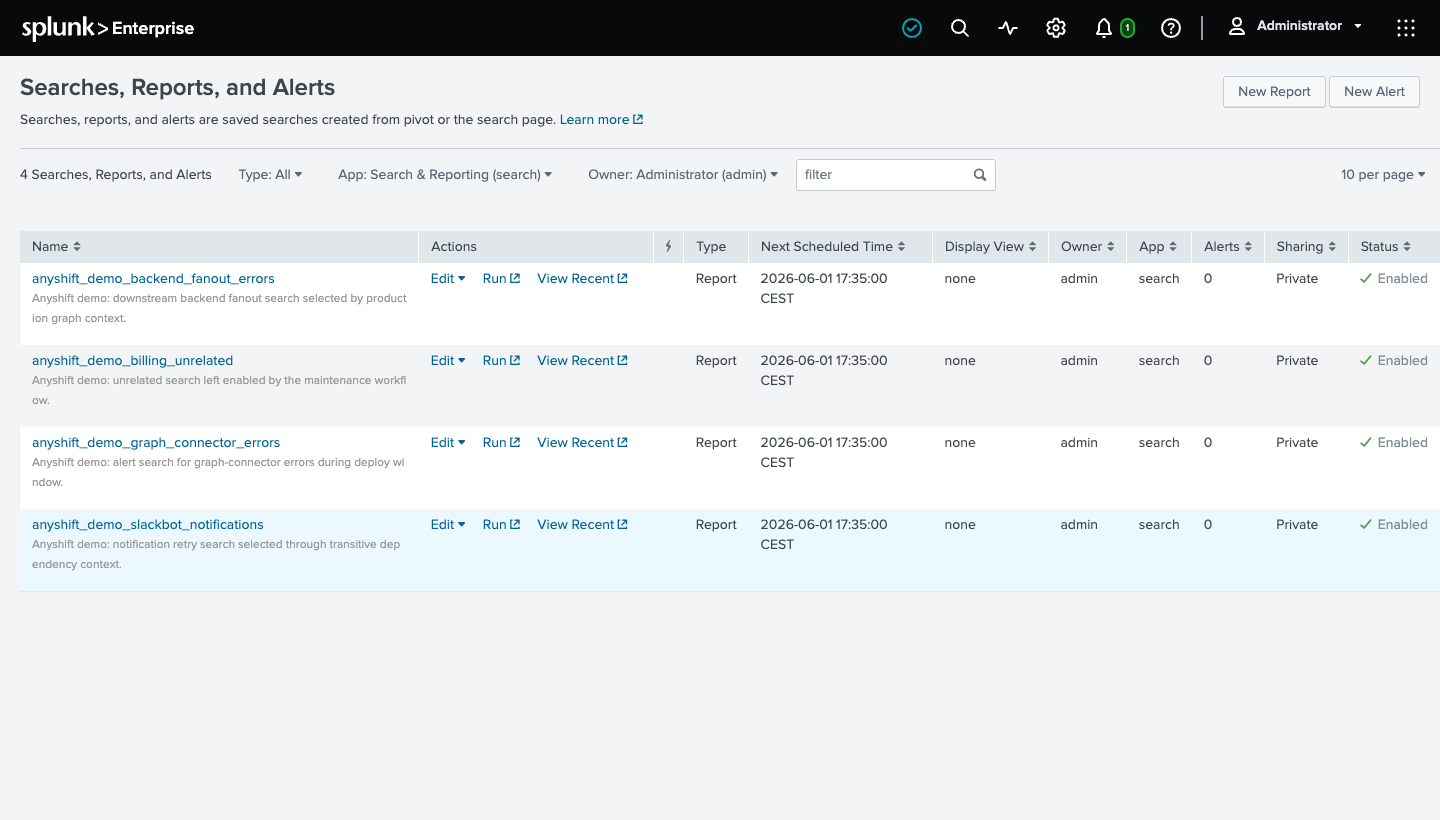
The fourth search, anyshift_demo_billing_unrelated, stays enabled. That's the control case: a broad mute would hide it, and the graph-scoped runbook leaves it alone.
Before approval, all four demo searches are enabled in Splunk:
After approval, Splunk shows the three graph-selected searches disabled and the unrelated search still enabled:
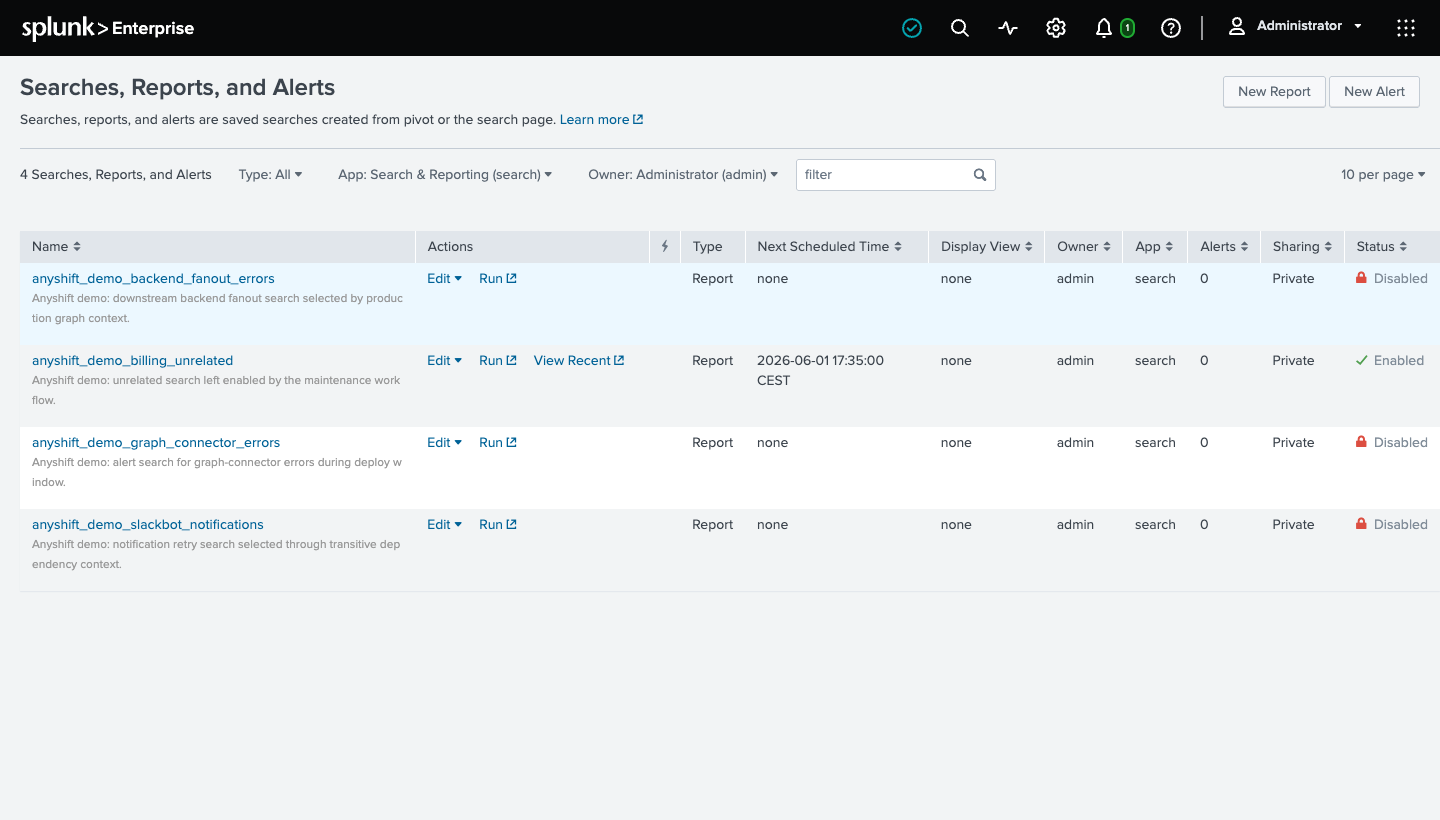
Splunk still owns the search definitions, alert actions, permissions, and history. Anyshift supplies the production scope and the evidence before the write.
When the window closes, the scheduled restore calls Splunk again and re-enables the same saved searches. The mute stays narrow, reviewable, and self-restoring.
Why A Deploy Script Is Not Enough
A deploy script knows what it's deploying. Splunk knows the saved searches configured in the search head.
Production is the missing join. A database migration, queue drain, Terraform change, or neo4j maintenance window can affect services that didn't deploy at all. Their saved searches still fire.
Anyshift supplies the missing layer:
- which services sit downstream of the target
- which Splunk saved searches monitor those services
- which searches are safe to disable automatically
- why each search was included
- when and how restore is scheduled
The operator still approves the run. Splunk remains the source of truth for the searches. Anyshift removes the stale checklist in between.
What Teams Get
Planned maintenance creates fewer noisy alerts without hiding unrelated production signal. The platform team doesn't hand-enumerate downstream saved searches, and on-call doesn't get paged by maintenance everyone already planned for. Restore is scheduled before the mute is allowed to succeed, so nobody re-enables searches from memory after the window closes.
The same shape can preview which saved searches a risky change will touch, route skipped searches to an owner, or prepare service-level maintenance for everything that depends on the target.
If your team uses Splunk and wants maintenance windows that follow production reality instead of a manual saved-search checklist, contact us.