A failed Snowflake refresh is a data problem. The repair can become a production change as soon as a running service reads that data.
A table refresh reaches past Snowflake
CHECKOUT_FEATURES is a Snowflake dynamic table used for checkout fraud scoring. An upstream problem stops its refresh. Once the source problem is fixed, a data engineer can ask Snowflake to refresh the table:
ALTER DYNAMIC TABLE ANYSHIFT_DEMO.PRODUCTION.CHECKOUT_FEATURES REFRESH;Snowflake has the table definition, refresh history, query history, warehouse, grants, and users. It can execute the repair. Before it does, the operator needs one more answer:
What could this refresh affect outside Snowflake?The answer changes the review. A refresh that feeds a customer-facing fraud decision needs different ownership and evidence from a refresh used only by an offline experiment.
What Anyshift adds to the Snowflake decision
Anyshift connects the Snowflake object to the production services that use it, then expands those services into the runtime path around them. The output is an impact assessment, not a dependency count.

For this workflow, Anyshift adds two direct consumers with different evidence:
checkout-api, owned bypayments-platform, is an observed consumer. Snowflake recorded access through a unique workload identity that Anyshift resolves to the production Kubernetes service.risk-worker, owned byrisk, is a declared consumer. Its application or deployment configuration says that it uses the table for backfills and replay work, even when it has not queried the table recently.
The first summary we used for the demo said only that checkout-api had six downstream dependencies. That was technically correct and operationally weak. An operator needs the services' roles, the customer path, the owners, the evidence behind each relationship, and the boundary between possible impact and a confirmed incident.
Anyshift production-impact review
snowflake_object: ANYSHIFT_DEMO.PRODUCTION.CHECKOUT_FEATURES
proposed_action: manual_refresh

direct_consumers:
  - service: checkout-api
    owner: payments-platform
    evidence: observed_access
    production_role: customer checkout fraud scoring
    potential_effect: stale or unavailable fraud decisions during checkout

  - service: risk-worker
    owner: risk
    evidence: declared_dependency
    production_role: fraud-feature backfills and replay
    potential_effect: delayed backfills or replay against stale features

connected_checkout_path:
  services: [pricing-api, ledger-api, notification-worker]
  datastores: [sessions-redis, checkout-postgres]
  external: [payment-provider]
  interpretation: inspect these paths if checkout-api is degraded

assessment:
  change_risk: high
  current_incident: unconfirmed
  decision: require_review
  reviewers: [payments-platform, risk]
This review is composed from Snowflake evidence and Anyshift graph queries. It is not the raw response from one API call. The distinction matters: the graph proves relationships and scope, while a connected monitor or incident source is needed to prove that a service is currently unhealthy.
The result gives the operator three useful boundaries. checkout-api is the direct customer path. risk-worker expands the operational scope without being presented as observed access. The connected services and datastores are places to inspect if checkout-api is degraded, not a claim that all of them have failed.
The impact review sits between Snowflake's data workflow and the native refresh. The same Snowflake object stays visible in both layers, while each consumer edge keeps its evidence and non-production paths stay outside the decision.

How CHECKOUT_FEATURES becomes connected to checkout-api
Anyshift needs a defensible edge between the Snowflake table and the production service before it can calculate impact. The workflow builds that edge from existing identity and access evidence.

The connector uses three evidence sources:
1. Snowflake Access History records that a Snowflake user accessed CHECKOUT_FEATURES.
2. Workload Identity Federation associates that Snowflake SERVICE user with an AWS IAM role, Azure managed identity, GCP service account, or OIDC subject.
3. Anyshift resolves that cloud identity to the Kubernetes, serverless, or cloud workload already present in the production graph.
For checkout-api, the evidence chain is:
CHECKOUT_FEATURES
← accessed by CHECKOUT_API_PROD
← federated from AWS IAM role checkout-api-prod
→ resolved by Anyshift to checkout-api
Workload identity does not assign a user to every Snowflake table. Access History supplies the table-to-user evidence. Federation supplies the user-to-cloud-identity relationship. Anyshift resolves the cloud identity to the service already present in the production graph.
Access History is historical evidence, not a live health signal. Snowflake documents latency of up to three hours, and some Query History records are absent depending on the SQL structure. Anyshift keeps the query time and evidence on the edge instead of treating that edge as current service health.
The result must keep its confidence level:
| Evidence | What the review can say |
|---|---|
| Recorded access through a unique workload identity | checkout-api is an observed consumer. |
| Application or deployment configuration names the dependency | risk-worker is a declared consumer. |
| Recorded access through an identity shared by several services | One of those services accessed the table; the group is a set of candidate consumers. |
| Permission grant without recorded access | The workload is a potential consumer. |
| No access record | No observed consumer edge exists yet. |
A shared identity still establishes a candidate service group connected to the table. It cannot prove which member executed a particular query. Anyshift keeps that ambiguity instead of manufacturing a one-to-one mapping.
Snowflake acts with production context
The impact assessment can be returned to a worksheet, task, Streamlit application, or governed agent. In this demo, a small table keeps the services, owners, and risk levels queryable in Snowsight:
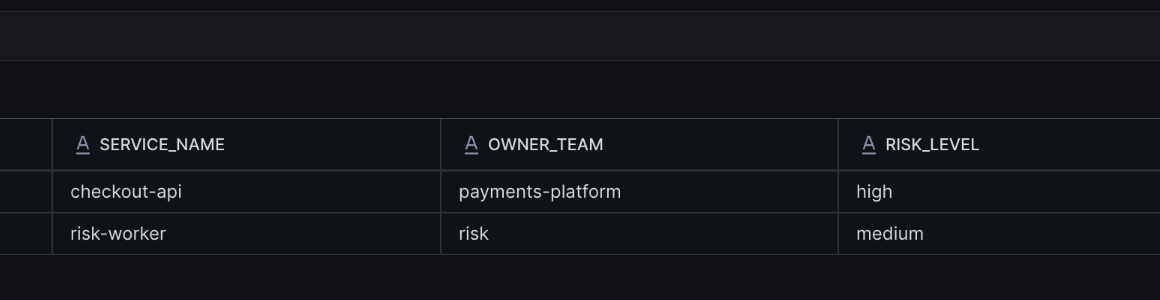
SELECT
  SERVICE_NAME,
  OWNER_TEAM,
  RISK_LEVEL
FROM ANYSHIFT_DEMO.PRODUCTION_CONTEXT.ANYSHIFT_PRODUCTION_CONTEXT;
The table is a delivery surface, not the product value by itself. The useful part is that high now means a customer checkout path with an observed consumer and an identified owner. medium identifies a declared replay path that should be included in the review.
Once the required owners approve, Snowflake executes its native command. Anyshift does not replace Snowflake execution or governance:
ALTER DYNAMIC TABLE ANYSHIFT_DEMO.PRODUCTION.CHECKOUT_FEATURES REFRESH;

SELECT
  name,
  state,
  refresh_trigger,
  refresh_start_time,
  refresh_end_time
FROM TABLE(
  INFORMATION_SCHEMA.DYNAMIC_TABLE_REFRESH_HISTORY()
)
WHERE name = 'CHECKOUT_FEATURES'
ORDER BY refresh_start_time DESC
LIMIT 10;
Snowflake verifies whether the refresh succeeded and whether it was manual. The Anyshift assessment remains the pre-change production review. If observability is connected, the workflow can run a separate health check after the refresh; the current demo does not claim that verification.
Snowflake gets a production guardrail
The same pattern applies beyond one manual refresh. A Snowflake task can check ownership before a sensitive write. A Cortex workflow can request a review before acting. A Streamlit application can show affected services and approvers beside the Snowflake object.
Snowflake already has the governed place where data work happens. Anyshift adds the production context needed to decide whether that work should happen now.
If your team uses Snowflake and wants production context beside governed data and AI workflows, contact us.