This workflow uses MongoDB Atlas (MongoDB's managed cloud database), Atlas alert settings (project-level alert configuration), and the Atlas Administration API with a service account to create a real alert configuration after Anyshift reviews the production context.
Summary
TL;DR: MongoDB Atlas can create a CONNECTIONS_PERCENT > 99 rule: alert when a cluster is almost out of configured connection capacity. Anyshift adds the missing review before that rule starts paging: affected services, owners, monitors, recent changes, and non-production exclusions.
MongoDB Atlas remains the database operations surface. In this workflow, Anyshift's annie do command creates the Atlas alert setting disabled and generates the context needed to decide whether it should be enabled, narrowed, or routed differently.
The example is intentionally small: one Atlas cluster, one threshold, three services. The value becomes clearer when the same review spans many Atlas projects, shared clusters, service owners, monitors, and environments where a raw database alert cannot tell you who should be paged.
The MongoDB Atlas Alert Decision
The concrete scenario is checkout connection pressure:
| Production path | Atlas condition | Decision before enabling |
|---|---|---|
checkout-api calls fraud scoring during checkout | Cluster0 reports CONNECTIONS_PERCENT | get payments-platform approval before paging |
risk-worker replays scoring jobs after pressure events | the same cluster metric can fire for shared pressure | include risk in review without making it the first route |
checkout-playground uses similar demo wiring | it should not influence production alert routing | skip it because it is non-production |
The workflow owner asks for an alert before traffic ramps: notify when Cluster0 reports CONNECTIONS_PERCENT above 99, use project-owner email notification, and keep the initial state disabled.
Atlas can create that rule without Anyshift. The Anyshift value is the step Atlas cannot infer from the metric alone: who will feel this alert if it fires, who should approve it, and should Atlas be allowed to notify them yet?
The Context Anyshift Adds Before Atlas Enables

For the checkout connection-capacity alert, Anyshift maps the Atlas metric to the production systems behind it:
checkout-api, owned bypayments-platform, uses the Atlas checkout fraud database during customer checkout.risk-worker, owned byrisk, replays fraud scoring jobs and shares the same Atlas dependency.checkout-playgroundis skipped because it is a non-production path and should not drive alert routing or approval.
The important relationship is not visible from the alert threshold alone: the Atlas alert setting for Cluster0 and CONNECTIONS_PERCENT maps to the checkout fraud database path, the checkout-api Kubernetes deployment, the connection-pool and checkout latency monitors, and the payments-platform owner.
Without that context, the workflow is mostly an English-to-API demo. With it, the workflow becomes a controlled change: create the native alert in Atlas, keep it disabled, and attach enough evidence for the owner to approve or change the route.
What Anyshift Does Beyond Alert Creation
The workflow owner starts with a plain-English request:
annie do "create a MongoDB Atlas alert config for checkout connections with production context"Annie is Anyshift's CLI and workflow interface. annie do is the reviewed workflow surface: it decides what production context is needed and renders deterministic Atlas API payloads. MongoDB Atlas remains the execution surface: the write happens through the Atlas Admin API against a real Atlas project.
The workflow separates the native Atlas rule from the production decision:
| Step | What Atlas gets | What Anyshift adds |
|---|---|---|
| Create the alert setting | OUTSIDE_METRIC_THRESHOLD, CONNECTIONS_PERCENT, threshold: 99, enabled: false | reason the first write should stay disabled |
| Build the context pack | nothing stored in the Atlas row | checkout-api, risk-worker, owners, monitors, dependency evidence, skipped checkout-playground |
The Atlas credentials stay local. In the sandbox tenant, the service account was scoped to Project Alerts Manager.
The Review Boundary Before Atlas Notifies
Before the alert can be enabled, the generated review starts with production impact, not API mechanics:

This is the control point: keep the alert disabled, narrow the threshold, route approval to a different owner, or stop before Atlas notifications are enabled. The production context does not pretend to live inside Atlas; it lives in the Anyshift review pack that explains the Atlas write.
The Result In MongoDB Atlas
The workflow created a real Atlas alert configuration through the Atlas Admin API. The native Atlas result is intentionally small:
| Atlas field | Value |
|---|---|
| Event type | OUTSIDE_METRIC_THRESHOLD |
| Metric | CONNECTIONS_PERCENT |
| Threshold | 99 |
| State | enabled: false |
| Alert config ID | 6a2827f2e9a021a4c626c2d8 |
That result appears in Atlas under Project Alerts -> Alert Settings:
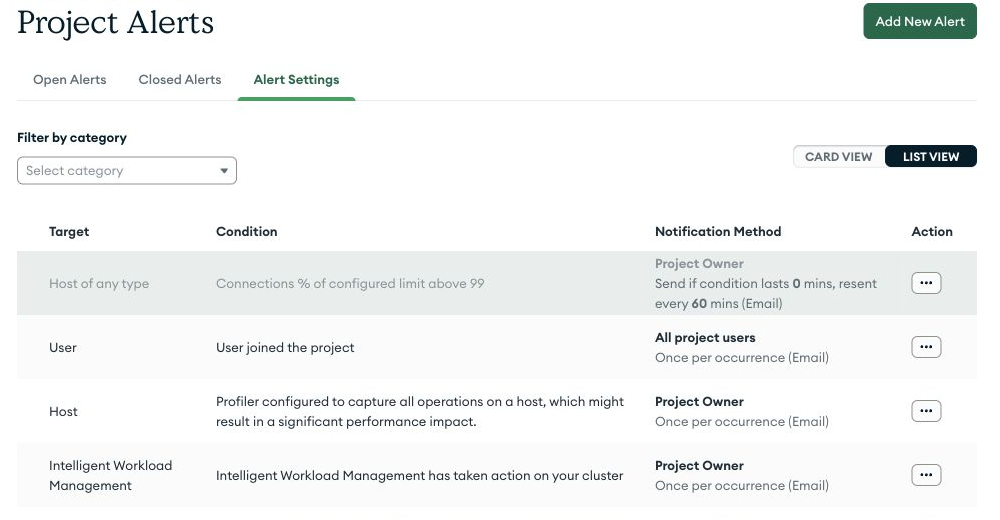
The screenshot is from the sandbox Atlas tenant used for this workflow. The production graph values are demo context; the Atlas service account, Admin API call, and alert setting are real.
At that point, the database team has a native Atlas alert that is ready but not noisy. The application/platform side has the missing review evidence: checkout-api owns the customer path, payments-platform should approve the first route, risk-worker shares the dependency, and checkout-playground should not drive production paging.
So the result is not "an Atlas alert row that magically contains the production graph." It is an Atlas-native alert staged behind a production-context review.
Why Atlas Alert Settings Are Not Enough
Atlas alert settings are the right native control surface: metric, threshold, notification method, and alert state.
But a database alert setting does not automatically know the production graph around the database. It may not know that the same Atlas cluster backs checkout fraud scoring, that checkout-api has an active latency monitor, or that a playground worker should be ignored.
That is the boundary:
| Native Atlas context | Anyshift production context |
|---|---|
cluster -> metric -> threshold -> notification | cluster -> service -> owner -> monitor -> recent change -> blast radius |
Anyshift is not replacing Atlas alerting, and it is not claiming the Atlas alert row now contains the whole graph. It adds the production context Atlas users need when an alert setting is about to become an operational commitment.
What Database And Platform Teams Get
Database teams keep working in MongoDB Atlas. Platform and application teams get the context they usually reconstruct manually: affected services, owners, monitors, recent changes, and non-production exclusions.
The result is a MongoDB Atlas-native alert setting that cannot quietly become a bad paging rule. The alert threshold is native Atlas. The decision to enable, narrow, or route it is backed by Anyshift's production graph.
Where MongoDB Atlas Workflows Go Next
Enable after review. Keep first writes disabled, then update Atlas once the owning team approves the threshold and notification path.
Route by production owner. Use Anyshift ownership context to choose the PagerDuty, Slack, or email notification target.
For MongoDB Atlas users, the win is simple: database alerts stay native to Atlas, but they do not become paging commitments until production ownership and impact are clear.
If your team uses MongoDB Atlas and wants database alerts with production context instead of manual service-and-owner reconstruction, contact us.