Annie is Anyshift's CLI for turning graph context into reviewed actions. This case study shows how annie do can send deployment context into Dynatrace through the native Events API v2 (the Dynatrace REST API for ingesting events). It follows Anyshift meets pup, Anyshift meets gcx, and Anyshift meets acli.
Summary
Anyshift turns production context for a deploy into a reviewed Dynatrace deployment event, so on-call teams see the changed service, owner, and affected Dynatrace monitored entity (the service, host, process, application, or custom resource Dynatrace observes) inside Dynatrace instead of reconstructing them from CI and infrastructure tabs.
In this demo, our service graph-connector is preparing a production deploy. CI could send a bare event, but Anyshift adds the production mapping CI usually lacks: which service this deploy represents today, who owns it, where it runs, and where the event should land in Dynatrace.
The example is intentionally small: one service deploy, one monitored entity, and one deployment event. The value becomes clearer when the same routing decision spans many deploy pipelines, namespaces, teams, and Dynatrace entities where a bare CI event cannot tell you where the event belongs.

Dynatrace stays where teams investigate. Anyshift adds the change context that is usually scattered across Git, Terraform, cloud state, Kubernetes, and ownership data.
Dynatrace Sees Runtime, Deploys Need Context
Dynatrace is not a shallow metrics sink. It already has a deep runtime graph: Smartscape on Grail (Dynatrace's topology graph on Grail, its observability data lakehouse) records monitored entities and relationships. Teams can query it with DQL (Dynatrace Query Language, a read-only pipeline query language for Grail data), including Smartscape traversal functions such as smartscapeNodes, smartscapeEdges, and traverse (nodes, relationships, and path traversal across topology).
The useful integration is not to replace that graph. It is to add the upstream change context Dynatrace cannot reliably infer from telemetry alone:
| Dynatrace graph | Anyshift graph | |
|---|---|---|
| Sees | monitored entities, runtime relationships, Problems (detected abnormal situations), events (timestamped Dynatrace records) | code, Terraform, cloud state, Kubernetes, ownership, deploy intent |
| Answers | what is happening in the running environment? | what changed, why, who owns it, and which runtime target should receive it? |
| Best handoff | native investigation surface | reviewed context before the event is written |
The gap is upstream of runtime telemetry. A deploy script can tell Dynatrace that version anyshift-demo-20260528-1231 shipped. It usually cannot say:
- which production service that deploy maps to today
- which team owns that service
- which namespace and runtime target are in scope
- which Terraform, Git, or cloud-state context explains the change
- which Dynatrace monitored entity should receive the event
That is the layer Anyshift supplies before Dynatrace receives the event.
What Anyshift Adds Before The Event
The Anyshift workflow starts with one request:
annie do --print "send Dynatrace deploy context for graph-connector"Here, annie do is the command-line entry point for Anyshift. It gathers the deployment context, writes a small review file, and stops before any write. The reviewed context includes:
- service:
graph-connector - owner:
platform - runtime scope:
prod - deployment version:
anyshift-demo-20260528-1231 - reason: expected deploy noise during a short production change
- Dynatrace target: the
graph-connectormonitored entity
Dynatrace calls that target selection an `entitySelector` (the filter syntax for choosing monitored entities). The Events API v2 uses it to attach an ingested event to matching monitored entities. Without it, the event can land at the environment level. With the graph context resolved first, it lands on the service the on-call engineer is already investigating.
The Reviewed Event Lands In Dynatrace
For the demo, the Anyshift workflow creates or updates graph-connector as a Dynatrace custom monitored entity through the Monitored entities API (the API for monitored entities and custom devices), then sends one `CUSTOM_DEPLOYMENT` info event (Dynatrace's event type for software deployments reported by third-party tools) through Events API v2.
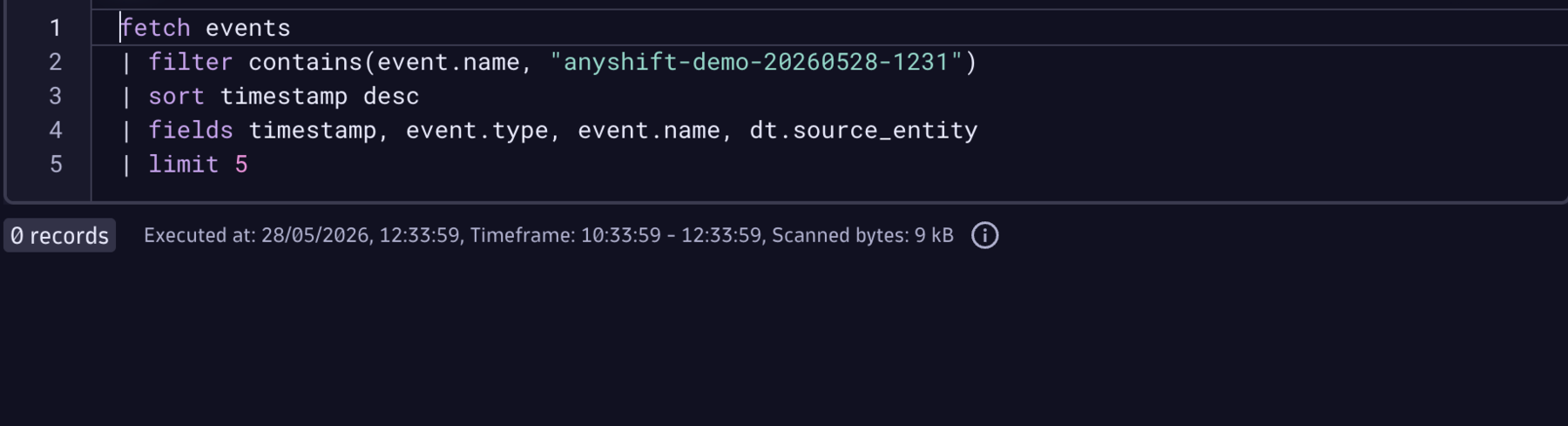
Before the run, the Dynatrace Notebook query (an interactive document for running DQL analysis) has no event for this deploy version:
After approval, the same query returns the native Dynatrace event:
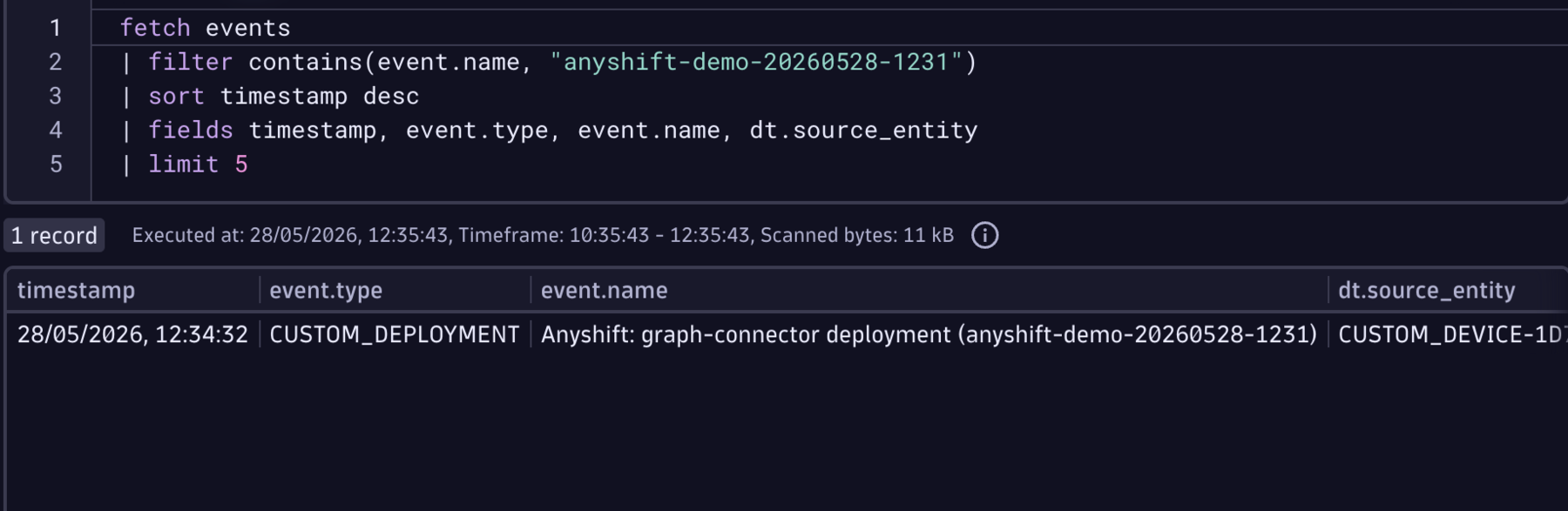
The important part is not that Anyshift created another place to look. It did not. The event is visible in Dynatrace, with Dynatrace permissions, Dynatrace history, and a monitored entity ID.
What The On-Call Team Gets
A thin deployment event says: something shipped.
An Anyshift-backed deployment event says: graph-connector shipped, the platform team owns it, it runs in prod, this is the Dynatrace entity attached to it, and this deploy is expected to create short-lived noise.
That saves work in two places. The deploy pipeline does not need to reimplement the production graph, and the on-call engineer does not need to reconstruct the change from tabs after the alert fires.
The same pattern can carry nearby workflows: attach Terraform or IAM change context to a Dynatrace Problem (a detected abnormal situation), send migration events only for services Anyshift knows are in scope, or enrich Dynatrace topology (Smartscape relationships) with the Git and IaC provenance behind a runtime entity.
If your team uses Dynatrace and wants deployment context from production reality, contact us.